
3 Database Schema Examples You Can Run in MySQL
A relational database schema describes the tables and columns that hold your data, the keys that identify rows, and the constraints that govern how rows relate to each other. To choose a starting schema, ask what your application must remember or prevent.
Run an example
We ran all three examples on Oracle MySQL 8.4.7. Each SQL file creates its own database and tables, inserts a few rows, then runs the query shown below. Use a fresh, isolated MySQL 8.4 test instance and an account with permission to create and populate the example databases. The names are schema_demo_shop, schema_demo_saas, and schema_demo_booking.
Download the .sql file for your example in Full SQL examples. To copy the script instead, open its accordion and save it under the filename shown. From the folder containing it, run this command in your terminal. Replace the host, port, and username with your test connection. For another example, replace ecommerce.sql with its filename.
mysql --host=127.0.0.1 --port=3306 --user=demo_user --password < ecommerce.sqlEnter your password at the prompt. Run each file once without --force so the client stops on the first SQL error. If the database name already exists, the first statement fails. Use a fresh test instance for another run. The SQL excerpts below highlight what to look for in the full files.
E-commerce orders
Maya orders two notebooks at 10.00 each and a pen at 4.50. The notebook is currently listed at 12.00. Which price belongs on her order? Keep the current price in products and record the agreed unit price on each order line when the order is placed.
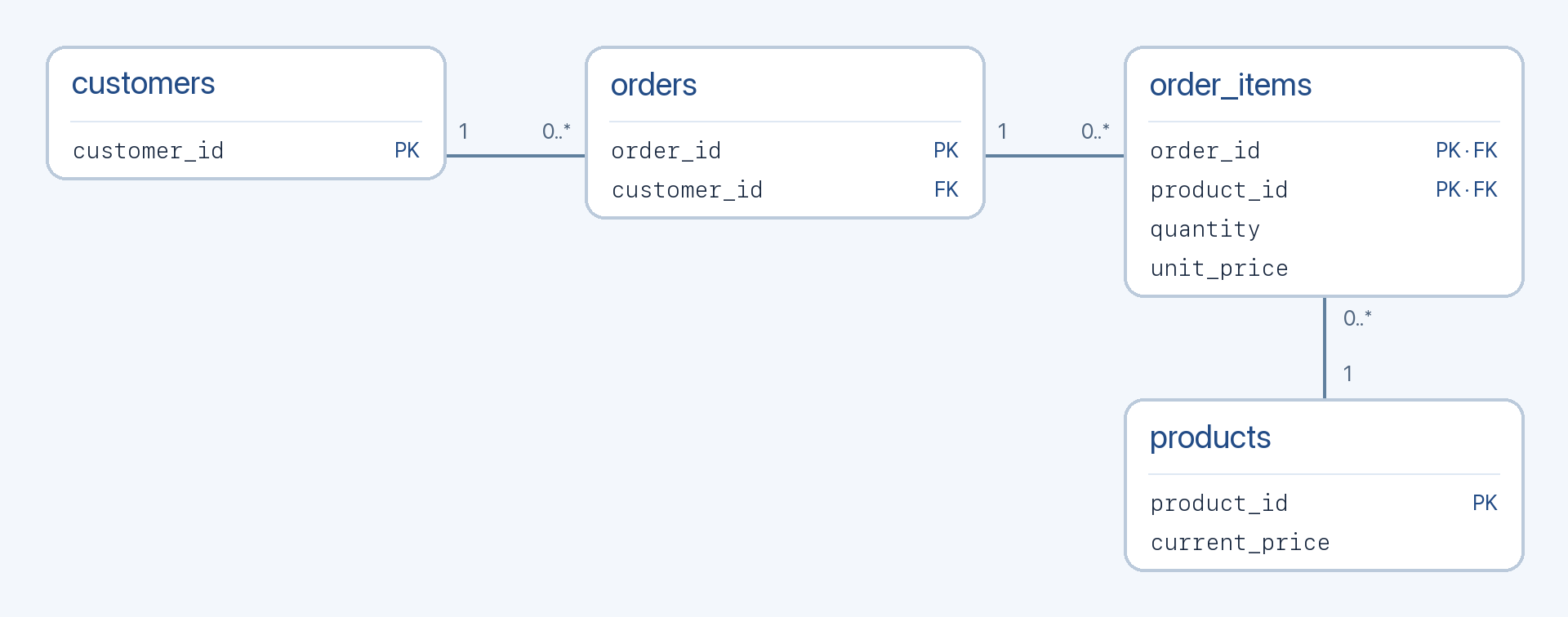
An order can contain several products, and the same product can appear in many orders. The order_items table records each pairing along with its quantity and price.
CREATE TABLE order_items (
  order_id INT NOT NULL,
  product_id INT NOT NULL,
  quantity INT NOT NULL CHECK (quantity > 0),
  unit_price DECIMAL(10,2) NOT NULL CHECK (unit_price >= 0),
  PRIMARY KEY (order_id, product_id),
  FOREIGN KEY (order_id) REFERENCES orders (order_id),
  FOREIGN KEY (product_id) REFERENCES products (product_id)
) ENGINE=InnoDB;
The primary key allows one row per product per order. In the sample insert, product 10 is the notebook and product 11 is the pen.
INSERT INTO order_items VALUES (101, 10, 2, 10.00), (101, 11, 1, 4.50);Two notebooks share one line with quantity = 2. The checks require a positive quantity and allow a unit price of zero. If the same product can appear twice at different prices in one order, give each line its own identity. Storing a sale price protects it from catalog updates. Your application still controls who may edit the order line itself.
To recover the subtotal, multiply the quantity by the price on each line, then sum the lines for that order.
SELECT o.order_id, c.name AS customer,
       SUM(i.quantity * i.unit_price) AS item_subtotal
FROM orders AS o
JOIN customers AS c ON c.customer_id = o.customer_id
JOIN order_items AS i ON i.order_id = o.order_id
GROUP BY o.order_id, c.name
ORDER BY o.order_id;Two notebooks contribute 20.00 and the pen contributes 4.50. Using today's catalog price would give 28.50. The result is an item subtotal before tax and shipping. A separate payment record would be needed to establish what Maya actually paid.
SaaS tenants and documents
North Studio and South Studio each have a document numbered 101. North's is Launch notes, owned by Sam. South's is Support guide, owned by Jo. In a shared-table application, combine the tenant ID with the document number so both documents can exist.
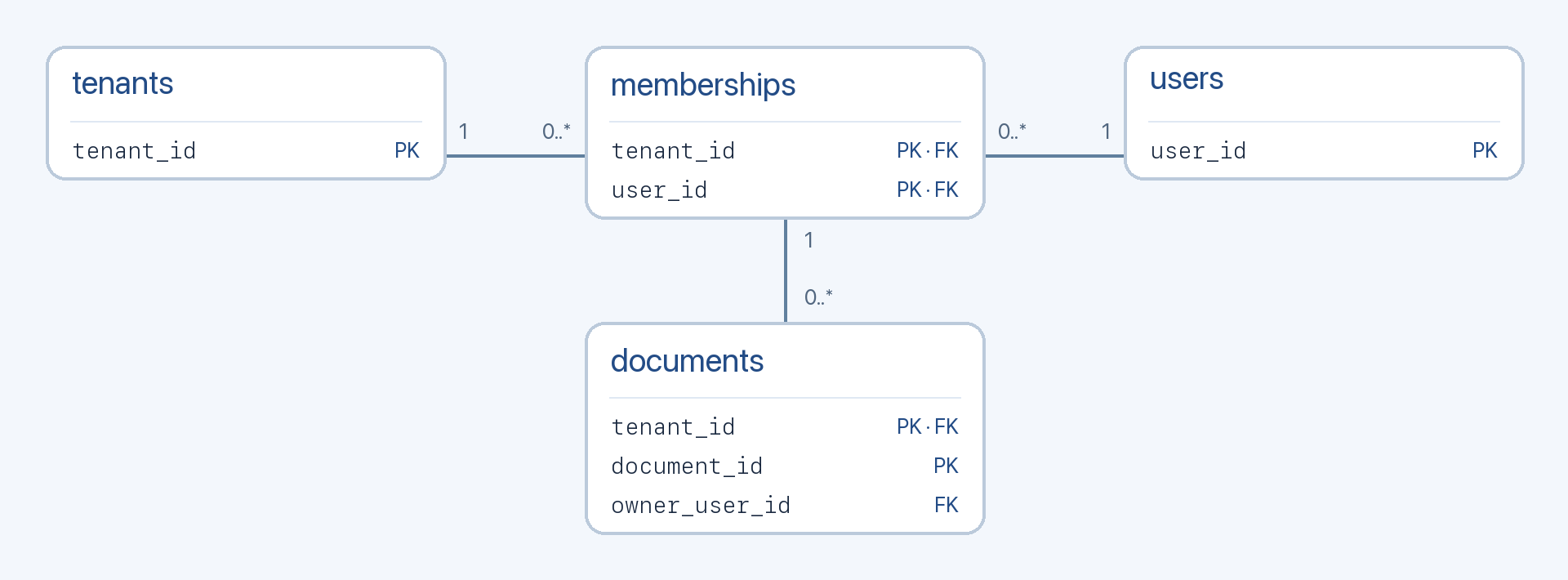
memberships identifies a user's membership by the pair (tenant_id, user_id). The foreign key in documents looks up both values together.
CREATE TABLE documents (
  tenant_id INT NOT NULL,
  document_id INT NOT NULL,
  owner_user_id INT NOT NULL,
  title VARCHAR(100) NOT NULL,
  PRIMARY KEY (tenant_id, document_id),
  FOREIGN KEY (tenant_id, owner_user_id)
    REFERENCES memberships (tenant_id, user_id)
) ENGINE=InnoDB;
Jo's user ID is 20 and her membership is in South Studio, tenant 2. We tried to create document 102 in North Studio, tenant 1, with Jo as the owner. MySQL returned ERROR 1452 because the membership (1, 20) was missing. Separate references to an existing tenant and an existing user would miss the mismatch.
For a document list, the application first checks which tenant the signed-in caller may access. This query uses tenant 1 to represent that authorized choice. In application code, bind the authorized tenant ID in the WHERE clause.
SELECT d.document_id, d.title, u.name AS owner
FROM documents AS d
JOIN users AS u ON u.user_id = d.owner_user_id
WHERE d.tenant_id = 1
ORDER BY d.document_id;Only North Studio's document appears. The foreign key checks ownership when rows are written. Read access depends on authorization and a tenant filter on each read. If you need to restore one customer's database independently of all others, a separate database per tenant is worth considering. You would then have more databases to migrate and operate.
Fixed-slot room bookings
Room Cedar is available in fixed 30-minute slots. Priya booked the 09:00 slot. Someone looking for a room should see 09:30, and a second attempt to reserve 09:00 should fail.

The slots table lists the start times the room actually offers. Its unique key on (room_id, starts_at_utc) keeps each start time unique within a room. A check accepts starts on the hour or half hour, with zero seconds. The application treats each start as a 30-minute slot and supplies UTC values. The DATETIME column stores no time zone.
CREATE TABLE reservations (
  reservation_id INT PRIMARY KEY,
  slot_id INT NOT NULL UNIQUE,
  booked_by VARCHAR(80) NOT NULL,
  FOREIGN KEY (slot_id) REFERENCES slots (slot_id)
) ENGINE=InnoDB;
The foreign key requires an existing slot. The unique constraint on slot_id allows a maximum of one reservation for that slot. To find openings, start with Cedar's slots and keep those with no matching reservation.
SELECT s.slot_id, r.name AS room, s.starts_at_utc
FROM slots AS s
JOIN rooms AS r ON r.room_id = s.room_id
LEFT JOIN reservations AS b ON b.slot_id = s.slot_id
WHERE s.room_id = 1 AND b.reservation_id IS NULL
ORDER BY s.starts_at_utc;Slot 100 at 09:00 already has Priya's reservation. Slot 101 at 09:30 has none. Seeing a slot in the list does not reserve it. When two customers choose it, the unique constraint allows only one reservation to succeed. The application can handle a duplicate-key error by showing the remaining openings.
If users choose arbitrary start and end times, two reservations with different starts can still overlap. That model needs an end time and a rule for rejecting overlaps for the same room, including simultaneous booking attempts.
Try one rule from your own application
Pick the example closest to your data and try one case that should fail. For Cedar, connect to schema_demo_booking on your test instance. Can Noor reserve the same 09:00 slot as Priya if Noor has a different reservation ID?
INSERT INTO reservations VALUES (501, 100, 'Noor');MySQL returned ERROR 1062 for duplicate slot 100. If your application actually sells multiple seats in one slot, that result tells you which rule to redesign.
For an existing MySQL database, start by checking for missing primary keys and duplicate indexes. Releem's guide explains what those findings mean, and its schema optimization tool can flag them on your database. MySQL Database Schema Checks · Releem Schema Optimization
Full SQL examples
-- Run once on an isolated Oracle MySQL 8.4 instance.
CREATE DATABASE schema_demo_shop CHARACTER SET utf8mb4 COLLATE utf8mb4_0900_ai_ci;
USE schema_demo_shop;
CREATE TABLE customers (
customer_id INT PRIMARY KEY,
name VARCHAR(80) NOT NULL
) ENGINE=InnoDB;
CREATE TABLE products (
product_id INT PRIMARY KEY,
name VARCHAR(80) NOT NULL,
current_price DECIMAL(10,2) NOT NULL CHECK (current_price >= 0)
) ENGINE=InnoDB;
CREATE TABLE orders (
order_id INT PRIMARY KEY,
customer_id INT NOT NULL,
FOREIGN KEY (customer_id) REFERENCES customers (customer_id)
) ENGINE=InnoDB;
CREATE TABLE order_items (
order_id INT NOT NULL,
product_id INT NOT NULL,
quantity INT NOT NULL CHECK (quantity > 0),
unit_price DECIMAL(10,2) NOT NULL CHECK (unit_price >= 0),
PRIMARY KEY (order_id, product_id),
FOREIGN KEY (order_id) REFERENCES orders (order_id),
FOREIGN KEY (product_id) REFERENCES products (product_id)
) ENGINE=InnoDB;
INSERT INTO customers VALUES (1, 'Maya');
INSERT INTO products VALUES (10, 'Notebook', 12.00), (11, 'Pen', 4.50);
INSERT INTO orders VALUES (101, 1);
INSERT INTO order_items VALUES (101, 10, 2, 10.00), (101, 11, 1, 4.50);
-- What is the item subtotal for each order?
SELECT o.order_id, c.name AS customer,
SUM(i.quantity * i.unit_price) AS item_subtotal
FROM orders AS o
JOIN customers AS c ON c.customer_id = o.customer_id
JOIN order_items AS i ON i.order_id = o.order_id
GROUP BY o.order_id, c.name
ORDER BY o.order_id;
-- Run once on an isolated Oracle MySQL 8.4 instance.
CREATE DATABASE schema_demo_saas CHARACTER SET utf8mb4 COLLATE utf8mb4_0900_ai_ci;
USE schema_demo_saas;
CREATE TABLE tenants (
tenant_id INT PRIMARY KEY,
name VARCHAR(80) NOT NULL
) ENGINE=InnoDB;
CREATE TABLE users (
user_id INT PRIMARY KEY,
name VARCHAR(80) NOT NULL
) ENGINE=InnoDB;
CREATE TABLE memberships (
tenant_id INT NOT NULL,
user_id INT NOT NULL,
PRIMARY KEY (tenant_id, user_id),
FOREIGN KEY (tenant_id) REFERENCES tenants (tenant_id),
FOREIGN KEY (user_id) REFERENCES users (user_id)
) ENGINE=InnoDB;
CREATE TABLE documents (
tenant_id INT NOT NULL,
document_id INT NOT NULL,
owner_user_id INT NOT NULL,
title VARCHAR(100) NOT NULL,
PRIMARY KEY (tenant_id, document_id),
FOREIGN KEY (tenant_id, owner_user_id)
REFERENCES memberships (tenant_id, user_id)
) ENGINE=InnoDB;
INSERT INTO tenants VALUES (1, 'North Studio'), (2, 'South Studio');
INSERT INTO users VALUES (10, 'Sam'), (20, 'Jo');
INSERT INTO memberships VALUES (1, 10), (2, 20);
INSERT INTO documents VALUES (1, 101, 10, 'Launch notes'),
(2, 101, 20, 'Support guide');
-- Which documents belong to the tenant whose ID was authorized by the application?
SELECT d.document_id, d.title, u.name AS owner
FROM documents AS d
JOIN users AS u ON u.user_id = d.owner_user_id
WHERE d.tenant_id = 1
ORDER BY d.document_id;
-- Run once on an isolated Oracle MySQL 8.4 instance.
CREATE DATABASE schema_demo_booking CHARACTER SET utf8mb4 COLLATE utf8mb4_0900_ai_ci;
USE schema_demo_booking;
CREATE TABLE rooms (
room_id INT PRIMARY KEY,
name VARCHAR(80) NOT NULL
) ENGINE=InnoDB;
CREATE TABLE slots (
slot_id INT PRIMARY KEY,
room_id INT NOT NULL,
starts_at_utc DATETIME NOT NULL,
UNIQUE (room_id, starts_at_utc),
CHECK (MINUTE(starts_at_utc) IN (0, 30) AND SECOND(starts_at_utc) = 0),
FOREIGN KEY (room_id) REFERENCES rooms (room_id)
) ENGINE=InnoDB;
CREATE TABLE reservations (
reservation_id INT PRIMARY KEY,
slot_id INT NOT NULL UNIQUE,
booked_by VARCHAR(80) NOT NULL,
FOREIGN KEY (slot_id) REFERENCES slots (slot_id)
) ENGINE=InnoDB;
INSERT INTO rooms VALUES (1, 'Cedar');
INSERT INTO slots VALUES (100, 1, '2026-12-01 09:00:00'),
(101, 1, '2026-12-01 09:30:00');
INSERT INTO reservations VALUES (500, 100, 'Priya');
-- Which pre-created 30-minute slots are currently free in Cedar?
SELECT s.slot_id, r.name AS room, s.starts_at_utc
FROM slots AS s
JOIN rooms AS r ON r.room_id = s.room_id
LEFT JOIN reservations AS b ON b.slot_id = s.slot_id
WHERE s.room_id = 1 AND b.reservation_id IS NULL
ORDER BY s.starts_at_utc;
Get your own database advisor
Try Releem premium today for FREE!